Click to Segment: Building an Interactive Image Segmentation Demo with SAM 2.1
Upload an image, click on any object, and it gets highlighted instantly. Not science fiction — just Meta's open-source SAM 2.1 combined with full-stack engineering.
Background: What Is Image Segmentation?
Image segmentation is one of the core tasks in computer vision: given an image, determine which object each pixel belongs to.
Traditional approaches require massive amounts of labeled data and extensive model fine-tuning — a high bar to clear.
In 2023, Meta released the Segment Anything Model (SAM), which fundamentally changed the game. SAM can perform zero-shot segmentation on any image for any object, requiring only a point or bounding box as a prompt from the user.
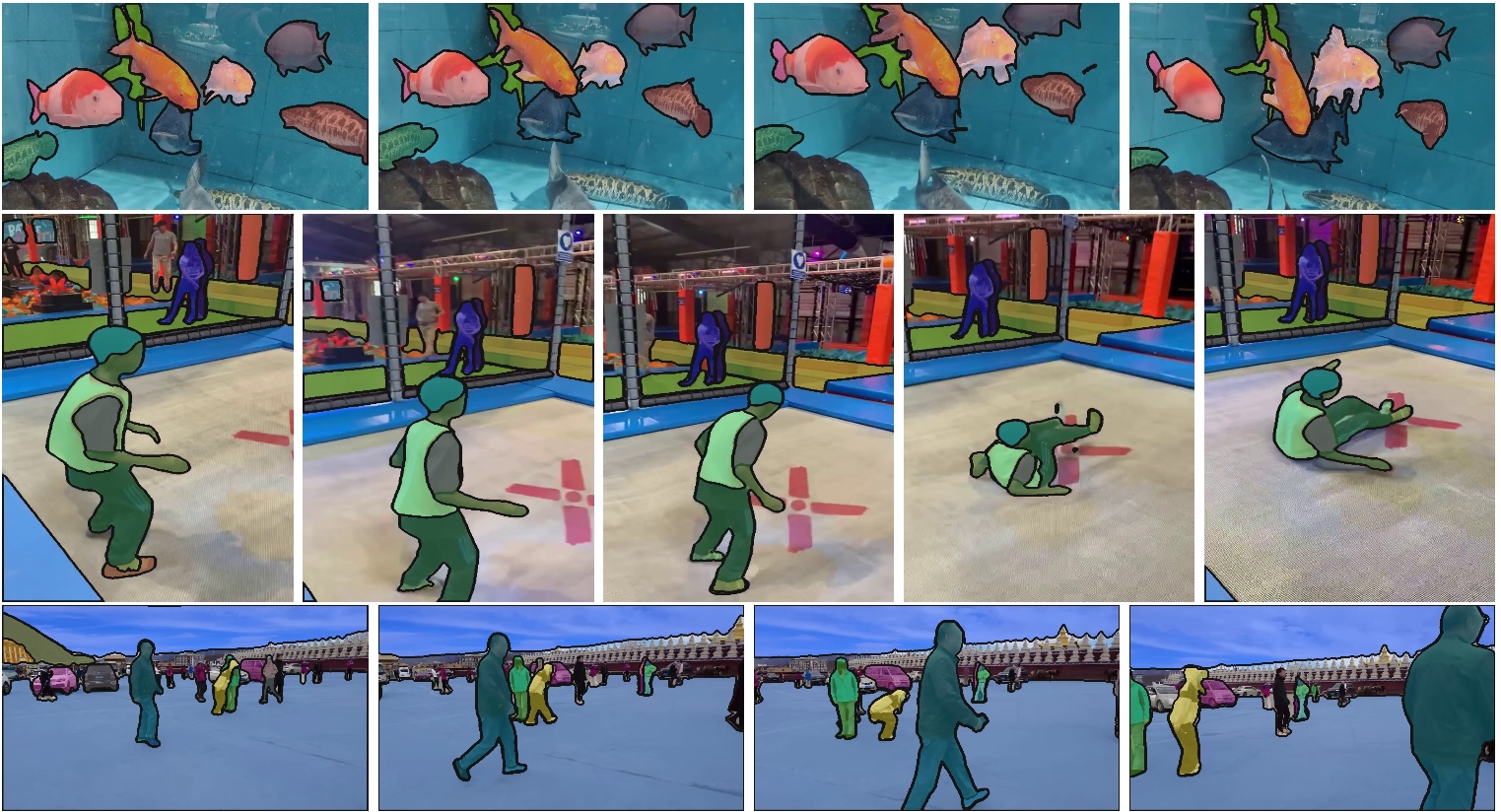
In September 2024, Meta released SAM 2.1 — better performance with fewer parameters, new video segmentation capability, and fully open-sourced under Apache 2.0.
Why SAM 2 Instead of SAM 3?
Meta's SAM family now spans three generations. Here's how they compare:
| Version | Released | Video Segmentation | Model Size | Access |
|---|---|---|---|---|
| SAM 1 | 2023.4 | ✗ | 86M ~ 641M | No approval needed |
| SAM 2 / 2.1 | 2024.7 / 2024.9 | ✓ | 39M ~ 224M | No approval needed |
| SAM 3 | 2025.11 | ✓ | Undisclosed | Approval required |
Why not SAM 3?
SAM 3 was released in November 2025, but downloading the weights requires submitting an access request on Hugging Face and waiting for approval. On top of that, SAM 3 mandates a CUDA GPU (PyTorch 2.7+, CUDA 12.6+), uses the SAM License instead of Apache 2.0, and comes with more restrictions. For a quick local demo, the barriers are simply too high.
Why not SAM 1?
SAM 1 doesn't support video segmentation, and its smallest model is still 86M — both slower and less accurate than SAM 2.1 at comparable sizes.
Why SAM 2.1:
- Latest officially open release — weights download directly with
wget, zero approval needed - 4 size variants (39M ~ 224M); the tiny model runs on CPU
- Unified architecture for image and video segmentation
- Apache 2.0 — fully open source and commercially friendly
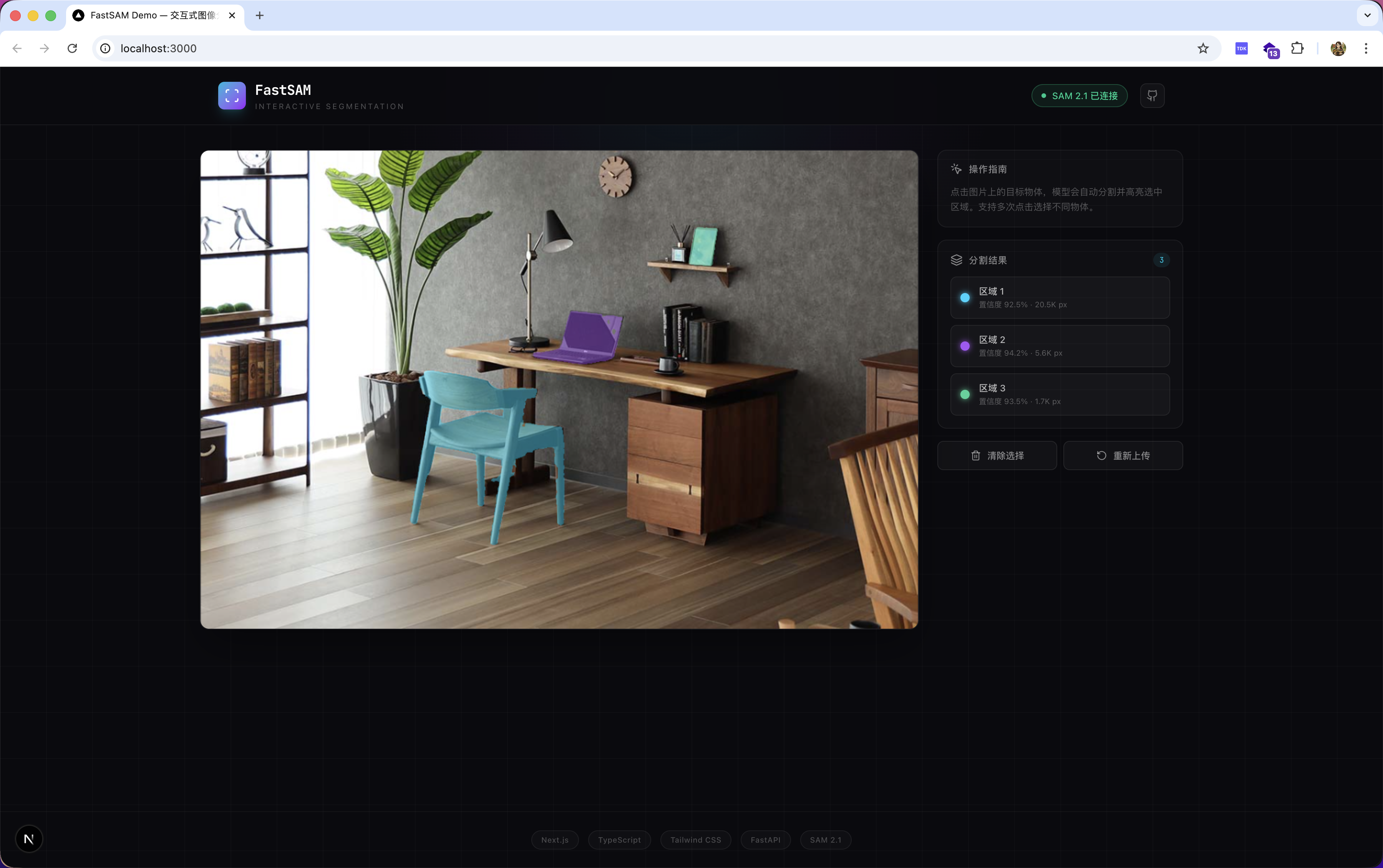
The Project: FastSAM-Demo
FastSAM-Demo is an interactive image segmentation web app built on SAM 2.1.
The interaction is as simple as it gets: upload an image → click an object → see it highlighted in real time.
Features
| Feature | Description |
|---|---|
| Click-to-segment | Millisecond-level response, no waiting |
| Multiple model sizes | tiny(39M) / small(46M) / base+(81M) / large(224M) |
| CPU-friendly | The tiny model runs without a GPU |
| Multi-object labeling | Different colors for multiple segmented regions |
| Efficient transfer | RLE compression with >98% reduction in mask data size |
| No approval needed | Weights download directly, Apache 2.0 licensed |
Tech Stack
Backend:  FastAPI + SAM 2.1 (Python / uv)
Frontend: Next.js 15 + TypeScript + Tailwind CSS v4 + Framer Motion
System Architecture
Two layers: the frontend handles interaction and rendering; the backend handles model inference.
Browser (Next.js + TypeScript)
│
│  User clicks image at (x, y)
│
▼
useSegmentation Hook
│ POST /api/segment
▼
FastAPI Server
│
├── Image Cache (reuses embedding, avoids re-encoding)
│
└── SAM 2.1 ImagePredictor
      ├── set_image()   ← computed once on upload
      └── predict()     ← called on each click, returns in milliseconds
Key Design: Embedding Cache
SAM 2.1 inference has two stages with very different latencies:
| Stage | Operation | Latency |
|---|---|---|
| Image Encoder | set_image() — precompute image features |
0.1s ~ 10s |
| Mask Decoder | predict() — generate mask from a point |
10ms ~ 100ms |
The optimization: image embedding is computed once on upload and cached. Every subsequent click only runs the lightweight Mask Decoder. This is why the interaction feels instantaneous.
Full Data Flow
1. User uploads image
 → POST /api/upload
 → Backend calls set_image(), caches embedding in memory
 → Returns image_id

2. User clicks image at (x, y)
 → Frontend maps coordinates (Canvas → original image space)
 → POST /api/segment { image_id, x, y }
 → Backend reuses cached embedding, calls predict()
 → SAM 2.1 returns masks + scores
 → RLE-compressed response sent to frontend
 → Frontend decodes and renders semi-transparent highlight on Canvas

3. More clicks → repeat step 2, masks accumulate
How SAM 2.1 Works
Architecture
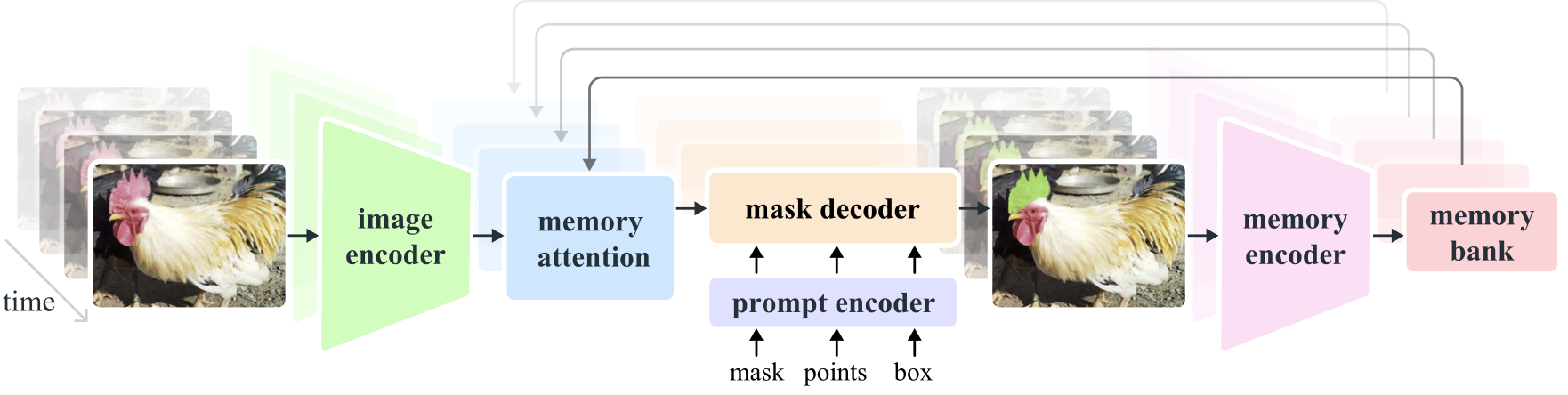
SAM 2.1 is built around three core modules:
Image / Video Frame
  │
  ▼
Hiera Encoder (image encoder)
  │ image embedding
  ▼
Mask Decoder ← Prompt Encoder (accepts point / box / mask prompts)
  │
  ▼
masks + scores + logits
- Hiera Encoder: a hierarchical visual encoder more efficient than SAM 1's ViT, with significantly fewer parameters
- Prompt Encoder: encodes click coordinates, bounding boxes, or mask hints
- Mask Decoder: fuses image features and prompts to output segmentation masks
- Memory Attention: propagates segmentation across frames in video mode (not used in this image-only demo)
Model Size Comparison
| Model | Parameters | Speed (A100) | Accuracy (SA-V J&F) |
|---|---|---|---|
| tiny | 38.9M | 91.2 FPS | 76.5 |
| small | 46M | 84.8 FPS | 76.6 |
| base+ | 80.8M | 64.1 FPS | 78.2 |
| large | 224.4M | 39.5 FPS | 79.5 |
For local CPU demos, tiny is the recommended choice — fast enough with acceptable quality.
Frontend Architecture
The frontend uses Next.js 15 (App Router) + TypeScript with clear separation of concerns:
types/       TypeScript type definitions (aligned with backend Pydantic schemas)
lib/         API client + RLE decoder + Canvas rendering utilities
hooks/       useSegmentation (business logic in one place)
components/  ImageUploader / SegmentCanvas / ControlPanel (pure UI)
app/         Next.js page entry points
Core principle: components own the UI; hooks own the logic.
Next.js rewrites proxy all API requests to the backend, eliminating CORS issues without any extra configuration in the frontend code.
Getting Started
# Clone the repo
git clone https://github.com/Eva-Dengyh/FastSAM-Demo.git
cd FastSAM-Demo

# One-command setup: installs dependencies, downloads model, starts both servers
./start.sh
Once running:
- Frontend: http://localhost:3000
- Backend API docs: http://localhost:8000/docs
Prefer manual setup?
# Backend
cd backend && uv sync
mkdir -p checkpoints
wget -O checkpoints/sam2.1_hiera_tiny.pt \
https://dl.fbaipublicfiles.com/segment_anything_2/092824/sam2.1_hiera_tiny.pt
uv run uvicorn app.main:app --host 0.0.0.0 --port 8000

# Frontend (new terminal)
cd frontend && npm install && npm run dev
Closing Thoughts
This project brings together state-of-the-art AI with full-stack engineering practice:
- SAM 2.1 delivers world-class segmentation capability, fully open source and free
- The FastAPI + Next.js stack demonstrates a clean, layered architecture
- Details like embedding caching and RLE compression show attention to real-world performance
If you're interested in AI + full-stack development, this is a solid starting point. The code is fully open source — Stars, forks, and issues are all welcome.
GitHub: https://github.com/Eva-Dengyh/FastSAM-Demo