Docker Basic Concepts
1.1 What is Docker
Docker was created to solve environment configuration issues in the software development process. Running software requires two core conditions: the operating system must be correctly configured, and all dependency libraries and components must be properly installed.
For example, a Python application requires the user's computer to have a Python runtime environment, various third-party dependency packages, and properly configured environment variables. When legacy modules conflict with new environments, compatibility issues become even more troublesome. Docker was born in this context.
Docker is an open-source containerization platform that uses operating system–level virtualization technology to package applications and their dependencies into lightweight, portable containers. These containers can run in any environment that supports Docker, ensuring application consistency and portability.
1.2 Core Concepts
Container
A container is a running instance of an image, similar to a small independent virtual environment. Essentially, it is an isolated process with its own filesystem, network, and process space, while sharing the operating system kernel with the host machine.
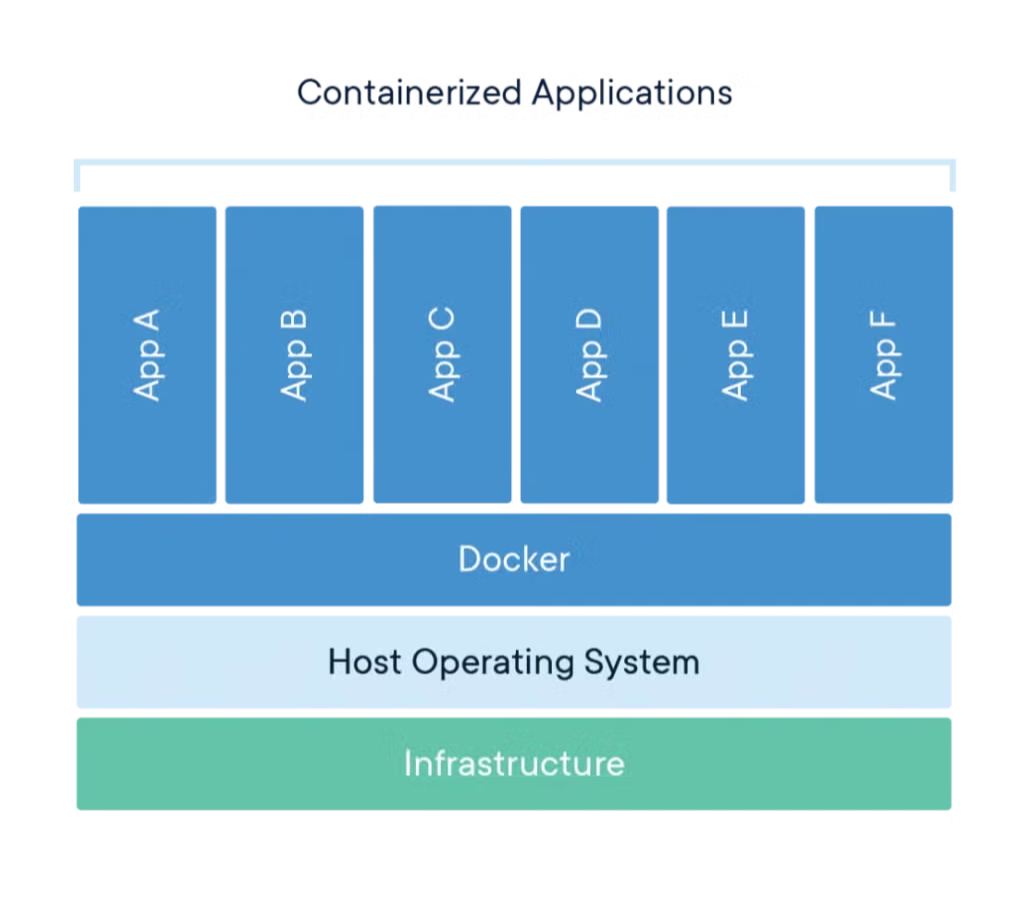
Similar to an "object" created from a "class" in object-oriented programming, one image can start multiple container instances, and each container has its own runtime state and data.
Image
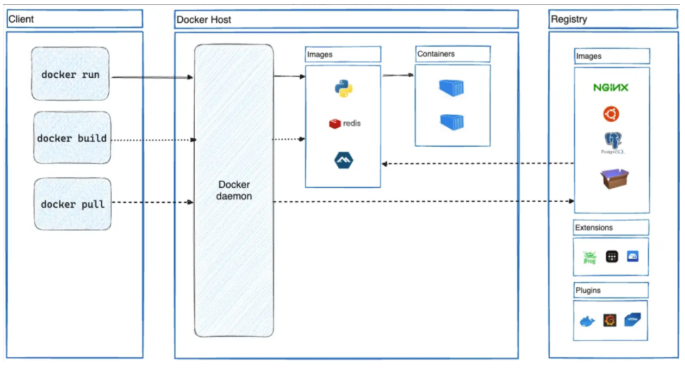
An image is a read-only template that contains the complete environment required to run an application: code, runtime libraries, system tools, environment variables, configuration files, and all dependencies.
It is similar to the "class" definition in object-oriented programming. It describes what a container should look like but cannot run directly. Containers are created and started based on images.
Dockerfile
A Dockerfile is a plain text file that contains a series of instructions used to build an image. It defines the entire process of building the final image step by step—from selecting the base image, installing dependencies, copying code, setting environment variables, to exposing ports.
It can be seen as the "recipe" or "script" for creating an image, making the image build process reproducible and version-controllable.
Repository
A repository is a centralized service for storing and distributing images, similar to a Git repository for source code.
Docker Hub is the largest public image repository, providing a large number of official and community-maintained images for download and use. Organizations can also set up private repositories to store internal images, enabling version management, distribution, and sharing.
1.3 Docker vs Traditional Virtual Machines
| Feature | Docker Containers | Traditional Virtual Machines |
|---|---|---|
| Startup Time | Starts in seconds | Starts in minutes |
| Resource Usage | Lightweight, shared kernel | Heavyweight, independent OS |
| Performance | Near native performance | Some performance overhead |
| Isolation | Process-level isolation | Hardware-level isolation |
| Portability | Highly portable | Relatively lower |
1.4 Installation
There are already many tutorials online about installation and configuration, so they will not be repeated here. Please refer to the official documentation:
https://docs.docker.com/desktop/
1.5 Basic Docker Commands
Common Docker commands:
https://www.runoob.com/docker/docker-command-manual.html
Dockerfile Writing Guide
### 2.1 Basic Syntax

```dockerfile
# Base image - must be the first instruction
FROM ubuntu:20.04

# Set working directory
WORKDIR /app

# Copy files into the container
COPY . .
COPY requirements.txt /app/

# Add files (supports URL and automatic extraction)
ADD https://example.com/file.tar.gz /tmp/

# Run commands (during build)
RUN apt-get update && apt-get install -y python3

# Expose port
EXPOSE 8080

# Set environment variables
ENV NODE_ENV=production

# Container startup command
CMD ["python3", "app.py"]
2.2 Common Instructions
| Instruction | Function | Example |
|---|---|---|
| FROM | Specify base image | FROM node:16-alpine |
| RUN | Execute shell commands | RUN npm install |
| COPY | Copy local files | COPY src/ /app/src/ |
| ADD | Copy files (with additional features) | ADD file.tar.gz /tmp/ |
| WORKDIR | Set working directory | WORKDIR /usr/src/app |
| EXPOSE | Declare port | EXPOSE 3000 |
| ENV | Set environment variables | ENV PATH=/app:$PATH |
| CMD | Default startup command | CMD ["npm", "start"] |
| ENTRYPOINT | Entry point command | ENTRYPOINT ["java", "-jar"] |
2.3 Python Flask Example
# Use official Python image
FROM python:3.9-slim

# Set working directory
WORKDIR /app

# Copy dependency file
COPY requirements.txt .

# Install dependencies
RUN pip install --no-cache-dir -r requirements.txt

# Copy application code
COPY . .

# Expose port
EXPOSE 5000

# Set environment variables
ENV FLASK_APP=app.py
ENV FLASK_ENV=production

# Startup command
CMD ["flask", "run", "--host=0.0.0.0"]
3. Docker Core Advantages
- Consistency: Ensures consistency across development, testing, and production environments
- Portability: Runs in any environment that supports Docker
- Resource Efficiency: More lightweight than traditional virtual machines
- Rapid Deployment: Containers can start and scale within seconds
```